10 AI Design Tools,
One App, One Week:
What Actually Works
10 AI Design Tools,
One App, One Week:
What Actually Works
Five years into a product design career, I came back to a college project with a different goal: not to fix it, but to turn it into a controlled experiment. I stress-tested 10 AI tools across every phase of the design process to find out what they actually do well, where they break down, and when a real design team would reach for them. The goal was never to showcase the app. It was to find out if these tools are actually worth the hype.
Five years into a product design career, I came back to a college project with a different goal: not to fix it, but to turn it into a controlled experiment. I stress-tested 10 AI tools across every phase of the design process to find out what they actually do well, where they break down, and when a real design team would reach for them. The goal was never to showcase the app. It was to find out if these tools are actually worth the hype.
Role
SOLO DESIGNER / RESEARCHER
SOLO DESIGNER / RESEARCHER
Type
AI EVALUATION · MOBILE UX · PROTOTYPING
AI EVALUATION · MOBILE UX · PROTOTYPING
Timeline
1 WEEK
1 WEEK
Tools
CHATGPT · FIGJAM · UX PILOT · BANANI · MAGIC PATTERNS · V0 · LOVABLE · FIGMA MAKE · CODIA · PAPER
CHATGPT · FIGJAM · UX PILOT · BANANI · MAGIC PATTERNS · V0 · LOVABLE · FIGMA MAKE · CODIA · PAPER
Outcome
10 AI TOOLS EVALUATED · 6 NEW SCREENS DESIGNED · 2 LIVE DEPLOYED PROTOTYPES ·
1 INTERACTIVE 35-SCREEN APP
10 AI TOOLS EVALUATED · 6 NEW SCREENS DESIGNED · 2 LIVE DEPLOYED PROTOTYPES ·
1 INTERACTIVE 35-SCREEN APP
KEY DECISION
Designed 3 screens per tool rather than rebuilding the full project each time. The goal was to see improvement across the workflow, not to produce a finished app 10 times over.
Designed 3 screens per tool rather than rebuilding the full project each time. The goal was to see improvement across the workflow, not to produce a finished app 10 times over.
VIEW THE WORK
VIEW THE WORK
The gap between these two links is what this case study is about.
The gap between these two links is what this case study is about.
what changed for me
what changed for me
I used to reach for AI tools when they seemed useful. Now I reach for them at specific moments, for specific reasons.
ChatGPT or Claude before opening any design tool. Banani for early layout exploration. Magic Patterns when the design system exists and I need components fast. Lovable when a stakeholder needs to actually click something. Figma Make when I'm evolving something that already exists. Codia when I need to bring deployed code back into Figma to edit it or build a component library. Paper when design and code need to be the same thing.
That clarity came from stress-testing every tool under the same conditions and watching exactly where each one broke down. The designers who get the most out of AI are the ones who already have strong judgment. These tools amplify what you bring to them.
I used to reach for AI tools when they seemed useful. Now I reach for them at specific moments, for specific reasons.
ChatGPT or Claude before opening any design tool. Banani for early layout exploration. Magic Patterns when the design system exists and I need components fast. Lovable when a stakeholder needs to actually click something. Figma Make when I'm evolving something that already exists. Codia when I need to bring deployed code back into Figma to edit it or build a component library. Paper when design and code need to be the same thing.
That clarity came from stress-testing every tool under the same conditions and watching exactly where each one broke down. The designers who get the most out of AI are the ones who already have strong judgment. These tools amplify what you bring to them.
TOOL 1: REFRAMING THE PROBLEM · CHATGPT
TOOL 1: REFRAMING THE PROBLEM · CHATGPT
Most designers skip this step entirely. That's a mistake.
Before touching any design tool, I used ChatGPT to interrogate the original research. Not to generate ideas, but to find what the original design had missed. I pasted user research findings, competitor analysis, and testing notes, then asked it to identify gaps.
The brief it surfaced became the foundation for every tool that followed. Same input, every time.
Most designers skip this step entirely. That's a mistake.
Before touching any design tool, I used ChatGPT to interrogate the original research. Not to generate ideas, but to find what the original design had missed. I pasted user research findings, competitor analysis, and testing notes, then asked it to identify gaps.
The brief it surfaced became the foundation for every tool that followed. Same input, every time.
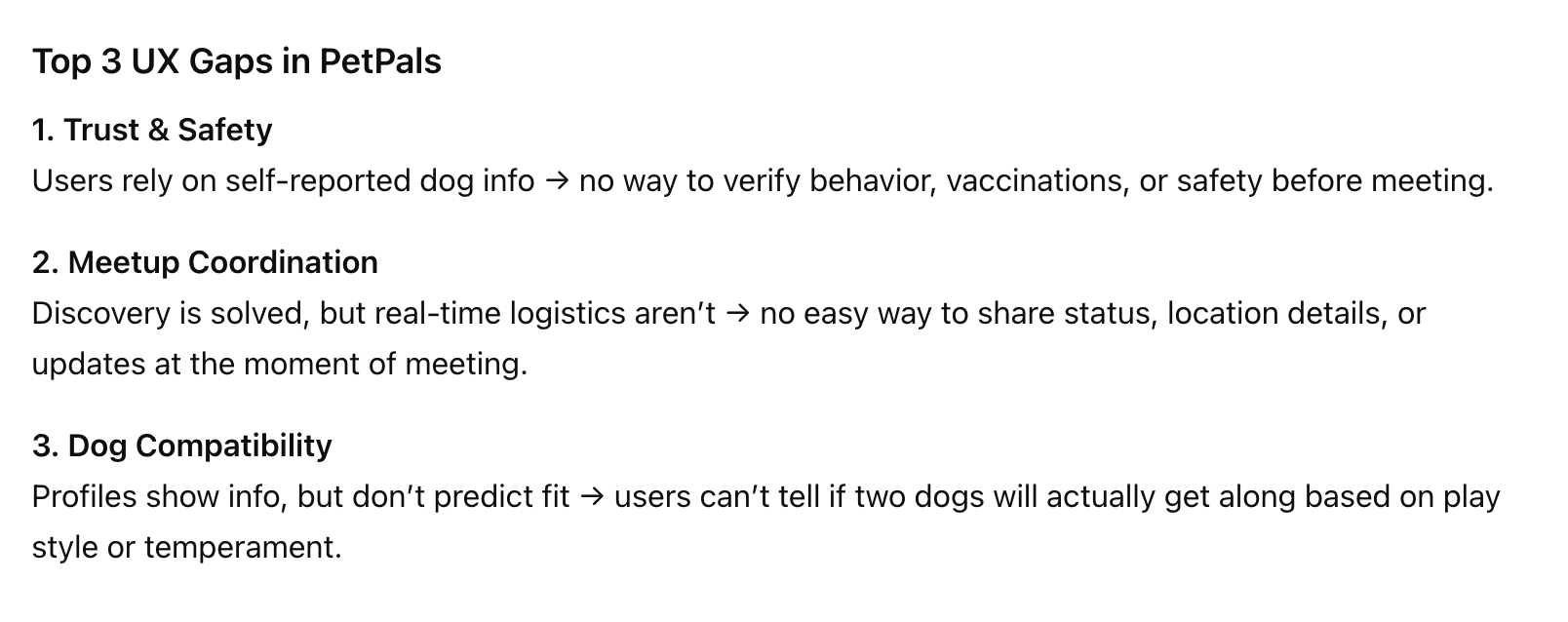
ChatGPT's response to the original PetPals research, surfacing 3 UX gaps the original design hadn't fully addressed.
ChatGPT's response to the original PetPals research, surfacing 3 UX gaps the original design hadn't fully addressed.
ChatGPT's response to the original PetPals research, surfacing 3 UX gaps the original design hadn't fully addressed.
The revised problem: dog owners need a way to find compatible, safe dogs to meet in real time, with verified safety information and real coordination tools.
The revised problem: dog owners need a way to find compatible, safe dogs to meet in real time, with verified safety information and real coordination tools.
TOOL 2: MAPPING THE REDESIGN · FIGJAM
TOOL 2:
MAPPING THE REDESIGN · FIGJAM
The spatial canvas changes how you think, not just how you present.
With a revised brief in hand, I moved into FigJam to map out the redesign before touching any screens. I used ChatGPT to generate the content, a 9-step user journey, a revised information architecture, 8 pain points, and 6 feature ideas, then organized everything spatially on the board.
The spatial canvas changes how you think, not just how you present.
With a revised brief in hand, I moved into FigJam to map out the redesign before touching any screens. I used ChatGPT to generate the content, a 9-step user journey, a revised information architecture, 8 pain points, and 6 feature ideas, then organized everything spatially on the board.
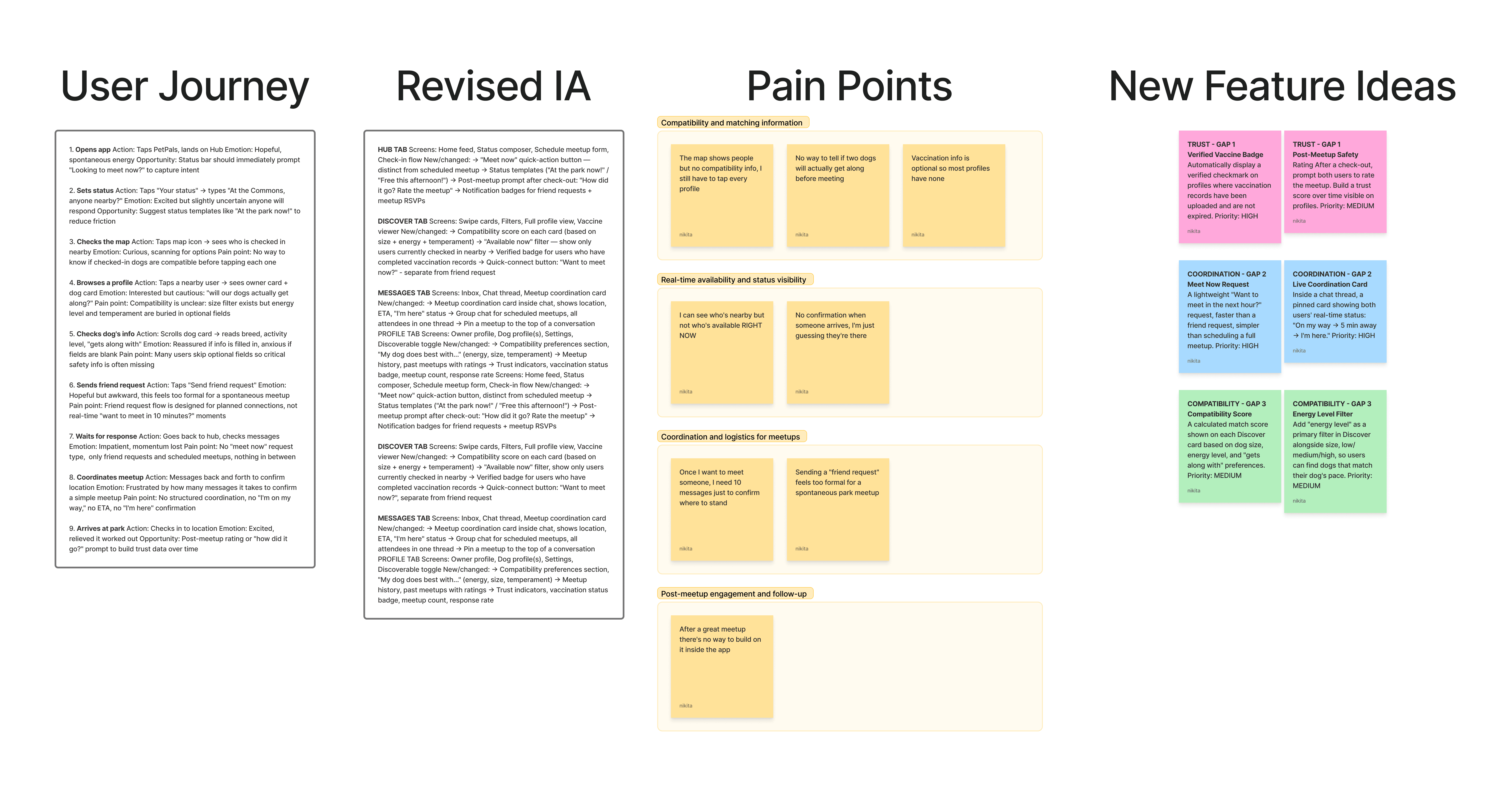
FigJam board populated with ChatGPT-generated content. FigJam's native AI automatically grouped the pain points into 4 themes and generated the summary card on the left.
FigJam board populated with ChatGPT-generated content. FigJam's native AI automatically grouped the pain points into 4 themes and generated the summary card on the left.
PAIN POINT THEMES
PAIN POINT THEMES
Compatibility matching information: users couldn't tell if dogs would get along before meeting.
Real-time availability: no way to see who was available right now, only who was nearby.
Coordination and logistics: too many messages to confirm a simple meetup.
Post-meetup engagement: no way to build on a good meetup inside the app.
Compatibility matching information: users couldn't tell if dogs would get along before meeting.
Real-time availability: no way to see who was available right now, only who was nearby.
Coordination and logistics: too many messages to confirm a simple meetup.
Post-meetup engagement: no way to build on a good meetup inside the app.
6 NEW FEATURE IDEAS
6 NEW FEATURE IDEAS
Verified vaccine badge: auto-displayed when records are uploaded and current.
Post-meetup safety rating: build trust data over time.
"Say Hi": faster than a friend request, simpler than scheduling.
Live coordination card: on my way, 5 min away, I'm here.
Compatibility score: size + energy + temperament match.
Energy level filter: primary filter alongside size.
Verified vaccine badge: auto-displayed when records are uploaded and current.
Post-meetup safety rating: build trust data over time.
"Say Hi": faster than a friend request, simpler than scheduling.
Live coordination card: on my way, 5 min away, I'm here.
Compatibility score: size + energy + temperament match.
Energy level filter: primary filter alongside size.
KEY LEARNING
KEY LEARNING
ChatGPT generates the thinking.
FigJam provides the spatial canvas. These are two separate tools that don't connect natively, but used in sequence they produce something neither can do alone: structured design thinking that's organized visually and shareable instantly.
The sequence matters as much as the tools.
ChatGPT generates the thinking.
FigJam provides the spatial canvas. These are two separate tools that don't connect natively, but used in sequence they produce something neither can do alone: structured design thinking that's organized visually and shareable instantly.
The sequence matters as much as the tools.
TOOL 3 & 4: GENERATING SCREENS · UX PILOT + BANANI
TOOL 3 & 4: GENERATING SCREENS · UX PILOT + BANANI
With the revised brief and IA mapped, I moved into screen generation, starting with two wireframing tools to test how well AI interprets layout intent from a text prompt alone. The most important thing I learned in this phase had nothing to do with visual quality. It was about prompting structure.
Both tools take a text prompt and generate hi-fi UI. The question was whether they could interpret layout intent accurately enough to be useful, and what it took to get there.
With the revised brief and IA mapped, I moved into screen generation, starting with two wireframing tools to test how well AI interprets layout intent from a text prompt alone. The most important thing I learned in this phase had nothing to do with visual quality. It was about prompting structure.
Both tools take a text prompt and generate hi-fi UI. The question was whether they could interpret layout intent accurately enough to be useful, and what it took to get there.
ONE PROMPT. ONE SCREEN. EVERY TIME.
ONE PROMPT. ONE SCREEN. EVERY TIME.
UX PILOT · TOOL 3
UX PILOT · TOOL 3
Useful inside Figma, but only if you already know what you're designing.
UX Pilot lives inside Figma as a plugin. You describe a screen and it generates hi-fi UI directly onto your canvas. I ran 3 rounds. Round 1 and 2 both produced 3 variations of the same screen rather than 3 distinct screens, the tool defaulted to interpreting "3 screens" as "3 versions of one screen." Round 3 used one prompt per screen. The outputs were immediately better.
Useful inside Figma, but only if you already know what you're designing.
UX Pilot lives inside Figma as a plugin. You describe a screen and it generates hi-fi UI directly onto your canvas. I ran 3 rounds. Round 1 and 2 both produced 3 variations of the same screen rather than 3 distinct screens, the tool defaulted to interpreting "3 screens" as "3 versions of one screen." Round 3 used one prompt per screen. The outputs were immediately better.
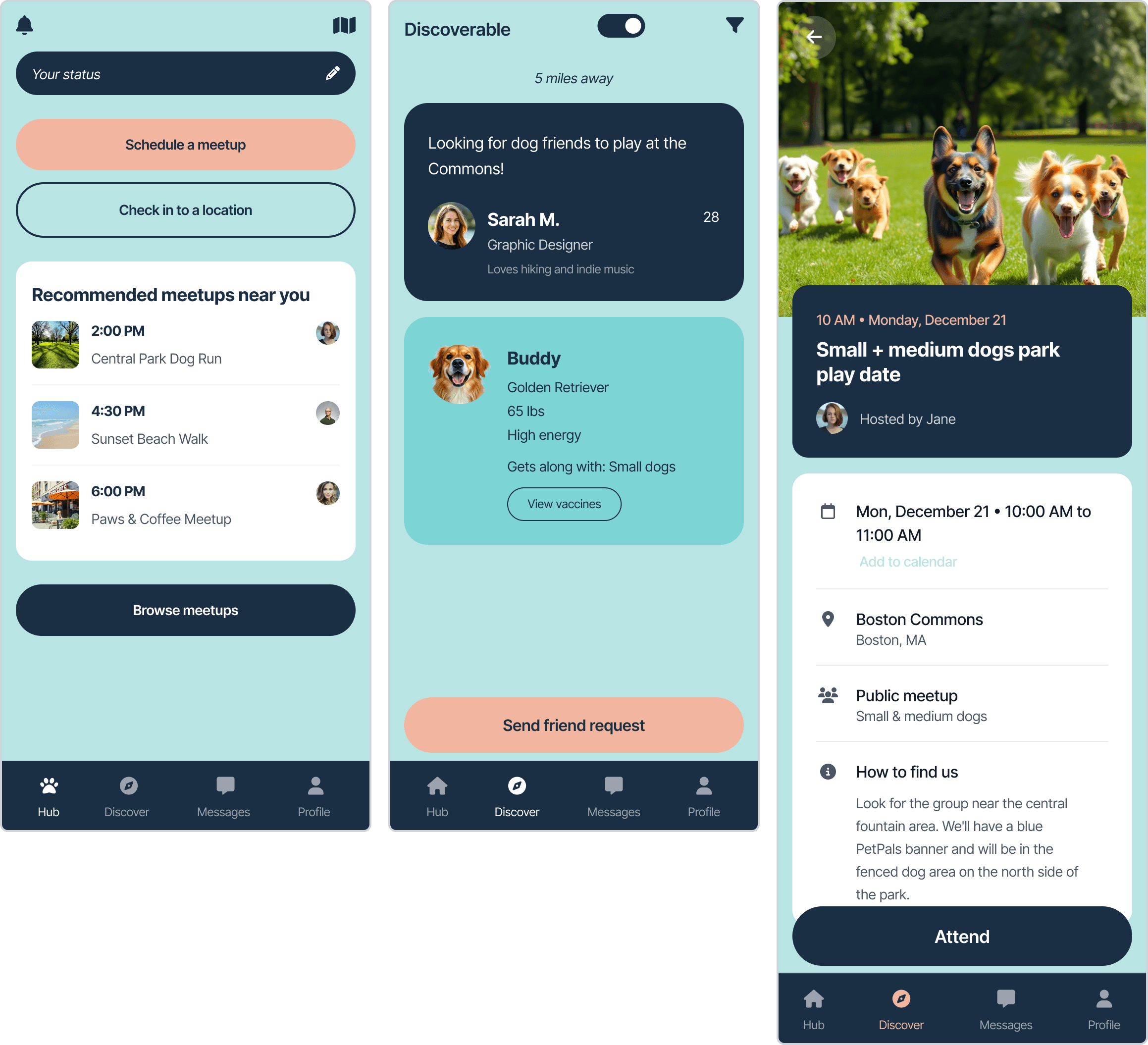
Round 3: 3 distinct screens using one prompt each.
Round 3: 3 distinct screens using one prompt each.
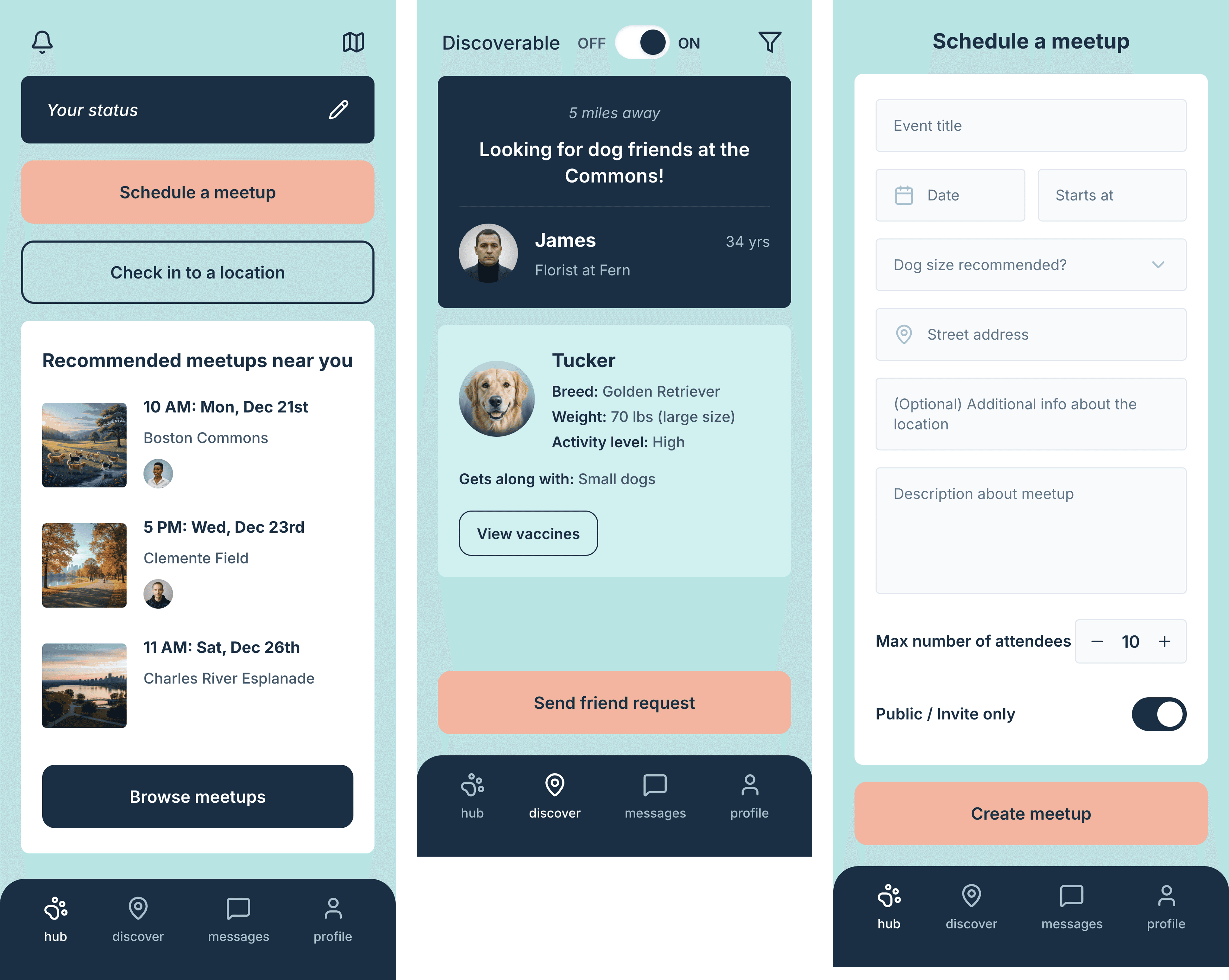
Hub, Discover, and Schedule Meetup form, all generated on first attempt with image references attached.
Hub, Discover, and Schedule Meetup form, all generated on first attempt with image references attached.
BANANI · TOOL 4
BANANI · TOOL 4
The fastest way to explore a layout direction you're not sure about yet.
Banani applied the one-screen-per-prompt rule from the start, and added image reference support out of the box. UX Pilot supports image references too, but only on the pro plan, so for this test it was text prompts only. Attaching the original hi-fi screens alongside the prompt gave Banani a visual anchor that hex codes alone couldn't provide. Color accuracy improved noticeably. The dual owner + dog card layout on Discover was understood immediately, without needing multiple rounds. The form screen was the strongest output, all fields present, correct layout hierarchy, clean minimal styling.
The fastest way to explore a layout direction you're not sure about yet.
Banani applied the one-screen-per-prompt rule from the start, and added image reference support out of the box. UX Pilot supports image references too, but only on the pro plan, so for this test it was text prompts only. Attaching the original hi-fi screens alongside the prompt gave Banani a visual anchor that hex codes alone couldn't provide. Color accuracy improved noticeably. The dual owner + dog card layout on Discover was understood immediately, without needing multiple rounds. The form screen was the strongest output, all fields present, correct layout hierarchy, clean minimal styling.
UX PILOT
UX PILOT
Best for: Single screen exploration inside an existing Figma workflow.
Limitation: Multi-screen prompts fail. One screen per prompt is required.
Implication: Anything generated here stays in the design phase. There's no path to code without a separate tool.
Best for: Single screen exploration inside an existing Figma workflow.
Limitation: Multi-screen prompts fail. One screen per prompt is required.
Implication: Anything generated here stays in the design phase. There's no path to code without a separate tool.
BANANI
BANANI
Best for: Multi-screen lo-fi flows when you already know your visual direction.
Advantage: Accepts image references, which significantly improves accuracy.
Implication: Strongest early in the process when you need to explore layout fast, before committing to a visual direction.
Best for: Multi-screen lo-fi flows when you already know your visual direction.
Advantage: Accepts image references, which significantly improves accuracy.
Implication: Strongest early in the process when you need to explore layout fast, before committing to a visual direction.
KEY LEARNING
KEY LEARNING
In this test, I focused on layout generation rather than code export. Both tools produce HTML/CSS, though neither outputs React or Tailwind, which would require additional work before handing off to a developer. Image references are not optional, they give the tool a visual anchor that text descriptions alone cannot provide.
In this test, I focused on layout generation rather than code export. Both tools produce HTML/CSS, though neither outputs React or Tailwind, which would require additional work before handing off to a developer. Image references are not optional, they give the tool a visual anchor that text descriptions alone cannot provide.
TOOL 5, 6 & 7: FROM WIREFRAMES TO CODE · MAGIC PATTERNS, V0, LOVABLE
TOOL 5, 6 & 7: FROM WIREFRAMES TO CODE · MAGIC PATTERNS, V0, LOVABLE
The hi-fi phase tested three fundamentally different tools, one that generates structured React components, one that deploys to a live URL, and one that builds a working interactive app. Same brief. Very different outputs.
The hi-fi phase tested three fundamentally different tools, one that generates structured React components, one that deploys to a live URL, and one that builds a working interactive app. Same brief. Very different outputs.
Magic patterns · TOOL 5
Magic patterns · TOOL 5
The only screen generator that respects your existing design system.
Magic Patterns generates real React components, not screen images. When I prompted the Hub screen, it first read the existing DiscoverScreen.tsx before writing new code. It maintained design system consistency the way a developer would. All three sharing the same design system. The color system, teal, navy, blush, held perfectly across every screen without correction.
The only screen generator that respects your existing design system.
Magic Patterns generates real React components, not screen images. When I prompted the Hub screen, it first read the existing DiscoverScreen.tsx before writing new code. It maintained design system consistency the way a developer would. All three sharing the same design system. The color system, teal, navy, blush, held perfectly across every screen without correction.
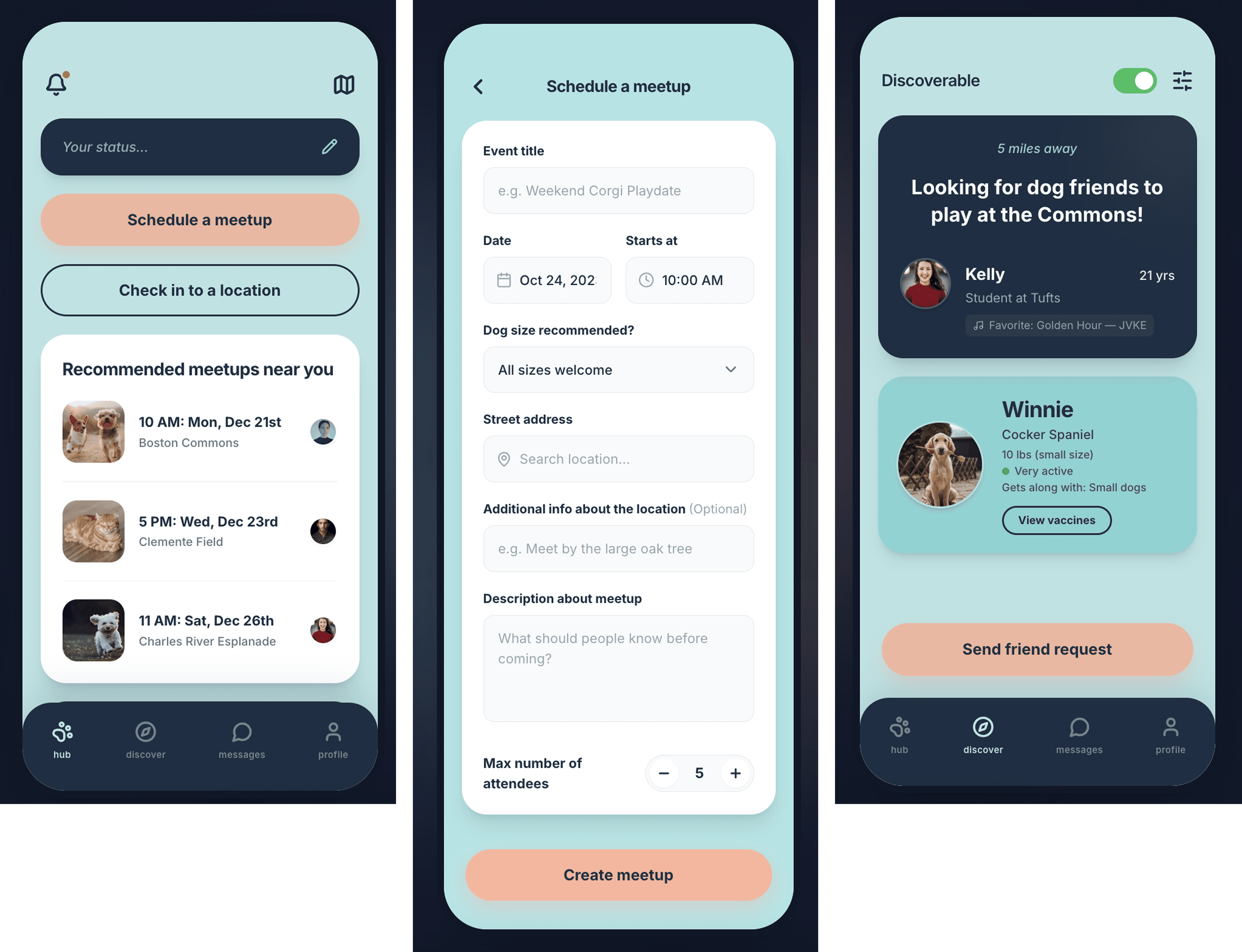
Magic Patterns generated structured React components that share a codebase, reading existing files before writing new ones.
Magic Patterns generated structured React components that share a codebase, reading existing files before writing new ones.
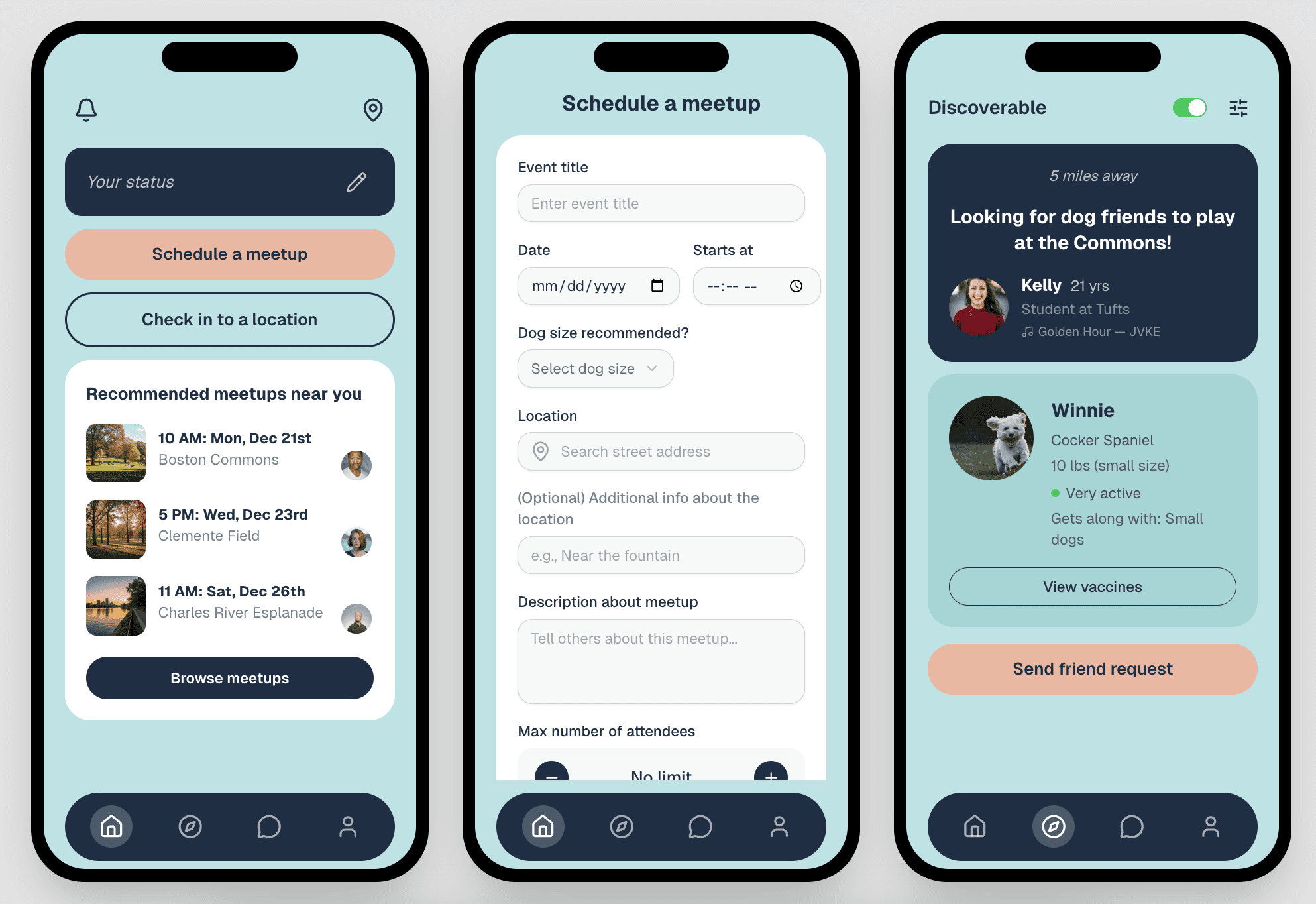
From prompt to live deployed URL in one session.
From prompt to live deployed URL in one session.
V0 BY VERCEL · TOOL 6
V0 BY VERCEL · TOOL 6
Impressive speed, forgettable output. Right tool for the wrong reasons most of the time.
v0 generated all 3 screens in one conversation using React + Tailwind, then deployed them to a live URL in minutes.
Impressive speed, forgettable output. Right tool for the wrong reasons most of the time.
v0 generated all 3 screens in one conversation using React + Tailwind, then deployed them to a live URL in minutes.
LOVABLE · TOOL 7
LOVABLE · TOOL 7
Nothing else comes close for getting something into a user's hands fast.
Lovable was the only tool in the experiment that produced something you could hand to a real user and say "try it." All 6 screens navigated correctly. Tapping "Schedule a meetup" went to the form. Tapping a meetup card opened the detail view. The messages tab opened individual chat threads. The gap between a screenshot and a working prototype is enormous in practice. Lovable is the only tool that closes it.
For user testing, stakeholder reviews, and any situation where someone needs to actually interact with the design rather than look at it, nothing else in this experiment came close.
Nothing else comes close for getting something into a user's hands fast.
Lovable was the only tool in the experiment that produced something you could hand to a real user and say "try it." All 6 screens navigated correctly. Tapping "Schedule a meetup" went to the form. Tapping a meetup card opened the detail view. The messages tab opened individual chat threads. The gap between a screenshot and a working prototype is enormous in practice. Lovable is the only tool that closes it.
For user testing, stakeholder reviews, and any situation where someone needs to actually interact with the design rather than look at it, nothing else in this experiment came close.

6 screens with working navigation, built from a single prompt.
Hub, Discover, Meetup Detail, Schedule Meetup, Map Check-in, Messages.
http://doggy-playdates-now.lovable.app/
6 screens with working navigation, built from a single prompt.
Hub, Discover, Meetup Detail, Schedule Meetup, Map Check-in, Messages.
http://doggy-playdates-now.lovable.app/
MAGIC PATTERNS
MAGIC PATTERNS
Output: Structured React components
Best for: Working closely with a development team. The code quality was high enough for a developer to use directly.
Unique strength: Architectural awareness, reads existing code before writing new code.
Output: Structured React components
Best for: Working closely with a development team. The code quality was high enough for a developer to use directly.
Unique strength: Architectural awareness, reads existing code before writing new code.
V0 BY VERCEL
V0 BY VERCEL
Output: React + Tailwind + live URL
Best for: Stakeholder demos and developer handoff. Fastest path from prompt to something shareable.
Unique strength: One-click Vercel deployment.
Output: React + Tailwind + live URL
Best for: Stakeholder demos and developer handoff. Fastest path from prompt to something shareable.
Unique strength: One-click Vercel deployment.
LOVABLE
LOVABLE
Output: Working interactive app
Best for: User testing, investor demos, any situation where people need to actually interact with the design.
Unique strength: The only tool that produced a real prototype someone could use.
Output: Working interactive app
Best for: User testing, investor demos, any situation where people need to actually interact with the design.
Unique strength: The only tool that produced a real prototype someone could use.
TOOL 8: CLOSING THE LOOP & DESIGNING IN CODE · FIGMA MAKE, CODIA WEB2FIGMA, PAPER + CURSOR
TOOL 8: CLOSING THE LOOP & DESIGNING IN CODE · FIGMA MAKE, CODIA WEB2FIGMA, PAPER + CURSOR
The final phase used AI tools differently from everything before it. Instead of generating screens from a brief, these tools started from existing designs, evolving them with new features, converting code back into Figma layers, and designing natively in code. This is where the experiment got interesting.
The final phase used AI tools differently from everything before it. Instead of generating screens from a brief, these tools started from existing designs, evolving them with new features, converting code back into Figma layers, and designing natively in code. This is where the experiment got interesting.
NOT RECREATING WHAT EXISTED. BUILDING WHAT SHOULD EXIST NEXT.
NOT RECREATING WHAT EXISTED. BUILDING WHAT SHOULD EXIST NEXT.
FIGMA MAKE · TOOL 8
FIGMA MAKE · TOOL 8
This is what evolution looks like. Not starting over, building forward.
I used Figma Make not to recreate existing screens but to evolve them, adding the 3 new features ChatGPT identified in the discovery phase. I also designed one brand new screen that never existed in the original prototype.
This is what evolution looks like. Not starting over, building forward.
I used Figma Make not to recreate existing screens but to evolve them, adding the 3 new features ChatGPT identified in the discovery phase. I also designed one brand new screen that never existed in the original prototype.

Left: Evolved Hub with Meet Now CTA and Who's nearby right now section.
Center: Evolved Discover with 87% compatibility badge and Vaccines verified trust indicator.
Right: Live Coordination, a brand new screen designed entirely from scratch.
Left: Evolved Hub with Meet Now CTA and Who's nearby right now section.
Center: Evolved Discover with 87% compatibility badge and Vaccines verified trust indicator.
Right: Live Coordination, a brand new screen designed entirely from scratch.
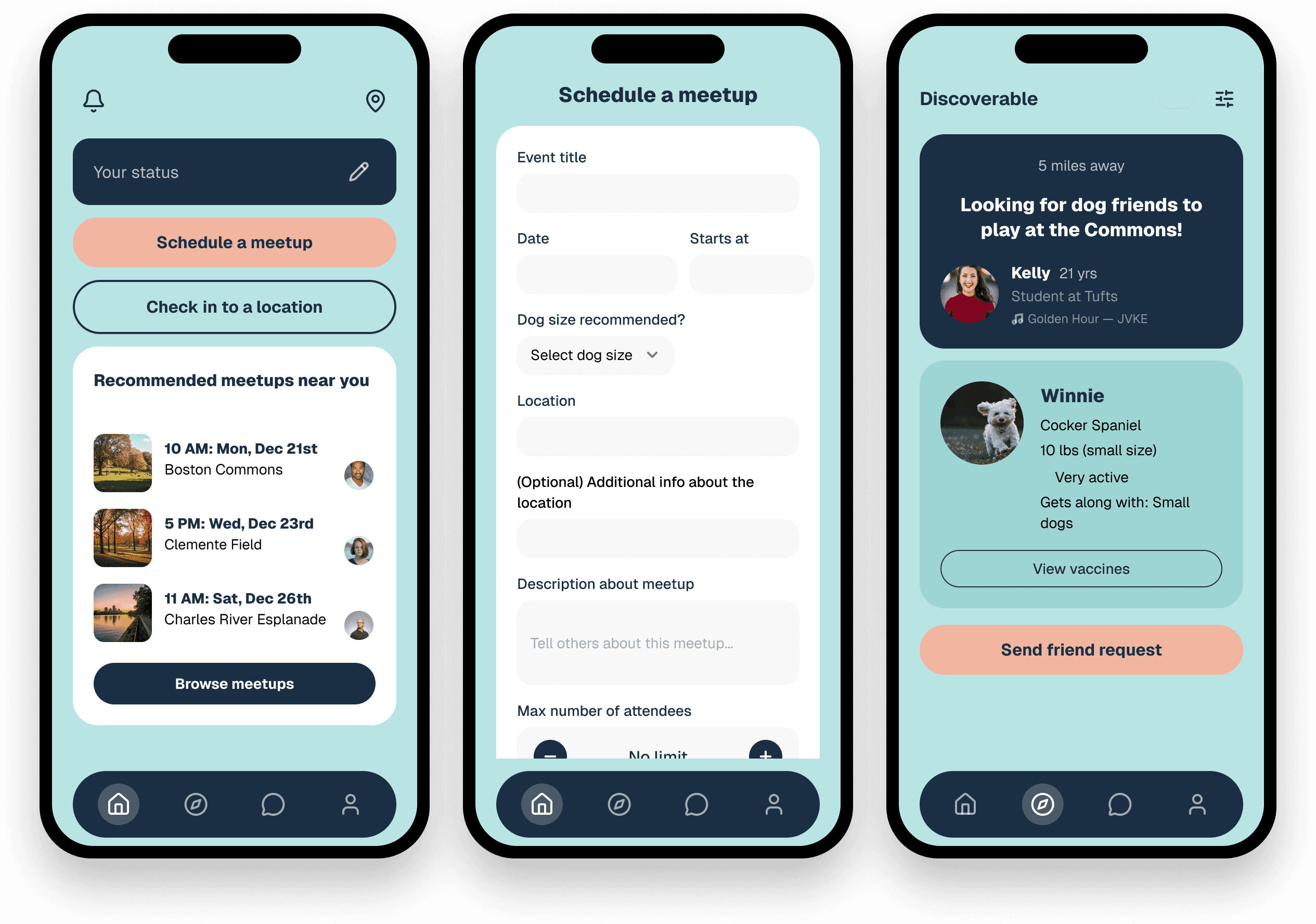
Imported Figma layers from the live v0 prototype, structured, named, and editable.
Imported Figma layers from the live v0 prototype, structured, named, and editable.
CODIA AI WEB2FIGMA · TOOL 9
CODIA AI WEB2FIGMA · TOOL 9
Closing the loop from code back to Figma is more powerful than it sounds.
I imported both live deployed prototypes, the v0 URL and the Lovable URL, back into Figma as editable layers. Both imports created structured, named layers rather than flat images, meaning the tool parsed the underlying CSS rather than screenshotting the page.
From those imported layers, I built a component library. Every component was traceable back to deployed code, which means the design system and the live product were in sync from day one. No redlines. No handoff doc. No drift between what was designed and what was built.
What this means for a team: a designer who can close this loop eliminates an entire category of handoff friction. The component library lives in Figma, but it was born from real code.
Closing the loop from code back to Figma is more powerful than it sounds.
I imported both live deployed prototypes, the v0 URL and the Lovable URL, back into Figma as editable layers. Both imports created structured, named layers rather than flat images, meaning the tool parsed the underlying CSS rather than screenshotting the page.
From those imported layers, I built a component library. Every component was traceable back to deployed code, which means the design system and the live product were in sync from day one. No redlines. No handoff doc. No drift between what was designed and what was built.
What this means for a team: a designer who can close this loop eliminates an entire category of handoff friction. The component library lives in Figma, but it was born from real code.
PAPER + CURSOR · TOOL 10
PAPER + CURSOR · TOOL 10
When design and code are the same thing, handoff becomes a non-issue.
Paper is a code-native design canvas, every element you place is simultaneously real HTML and CSS. There is no handoff step because design and code are the same thing. I connected Paper's MCP server through Cursor and designed 2 brand new screens: the Compatibility Score Detail view and the Post-Meetup Rating screen. Both are features that never existed in the original prototype, both addressing the trust and safety gap identified in the discovery phase.
When design and code are the same thing, handoff becomes a non-issue.
Paper is a code-native design canvas, every element you place is simultaneously real HTML and CSS. There is no handoff step because design and code are the same thing. I connected Paper's MCP server through Cursor and designed 2 brand new screens: the Compatibility Score Detail view and the Post-Meetup Rating screen. Both are features that never existed in the original prototype, both addressing the trust and safety gap identified in the discovery phase.

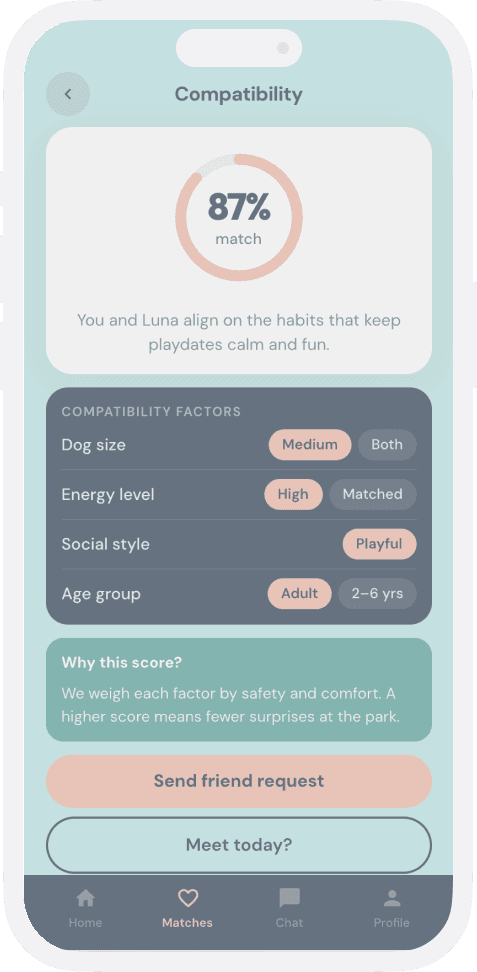
Left: Compatibility Score Detail - explains why two dogs are an 87% match across 4 factors.
Right: Post-Meetup Rating- star rating, selectable tags, optional note.
Both designed in Paper's code-native canvas.
Left: Compatibility Score Detail - explains why two dogs are an 87% match across 4 factors.
Right: Post-Meetup Rating- star rating, selectable tags, optional note.
Both designed in Paper's code-native canvas.
What you design visually is actual code. There is no handoff because there is nothing to hand off.
What you design visually is actual code. There is no handoff because there is nothing to hand off.
FIGMA MAKE
FIGMA MAKE
Best for: Evolving existing designs with new features. The highest color fidelity and layout precision of any tool tested.
Not for: Starting from scratch. It works best when you bring a strong design foundation to it.
Best for: Evolving existing designs with new features. The highest color fidelity and layout precision of any tool tested.
Not for: Starting from scratch. It works best when you bring a strong design foundation to it.
CODIA WEB2FIGMA
CODIA WEB2FIGMA
Best for: Design-developer collaboration workflows where AI-generated code needs to re-enter the design canvas.
Not for: Solo design work. The value is in the team workflow, not the individual output.
Best for: Design-developer collaboration workflows where AI-generated code needs to re-enter the design canvas.
Not for: Solo design work. The value is in the team workflow, not the individual output.
PAPER + CURSOR
PAPER + CURSOR
Best for: Small teams moving fast where the designer and developer are close, or the same person.
The elimination of the handoff step is genuinely significant. What you design is what ships.
Best for: Small teams moving fast where the designer and developer are close, or the same person.
The elimination of the handoff step is genuinely significant. What you design is what ships.
BEFORE VS AFTER
BEFORE VS AFTER
Reframing the problem with fresh eyes revealed six specific gaps the original design hadn't solved. These aren't iteration changes. They're structural improvements that only became visible when the brief was interrogated rather than assumed.
Reframing the problem with fresh eyes revealed six specific gaps the original design hadn't solved. These aren't iteration changes. They're structural improvements that only became visible when the brief was interrogated rather than assumed.
Original
Original
Evolved
Evolved
Discoverable toggle, confusing, no teaser
Discoverable toggle, confusing, no teaser
Discoverable toggle, confusing, no teaser
"Meet Now" primary CTA + "Who's nearby right now" section
"Meet Now" primary CTA + "Who's nearby right now" section
"Meet Now" primary CTA +
"Who's nearby right now" section
Friend request only, too formal for spontaneous meetups
Friend request only, too formal for spontaneous meetups
Friend request only, too formal for
spontaneous meetups
"Say Hi" quick connect alongside friend request
"Say Hi" quick connect alongside friend request
"Say Hi" quick connect
alongside friend request
Size filter only on Discover
Size filter only on Discover
Size filter only on Discover
87% compatibility score + energy level matching
87% compatibility score + energy level matching
87% compatibility score +
energy level matching
Vaccination list, optional, frequently skipped
Vaccination list, optional, frequently skipped
Vaccination list, optional, frequently skipped
"Vaccines verified" auto-displayed trust badge
"Vaccines verified" auto-displayed trust badge
"Vaccines verified"
auto-displayed trust badge
No coordination after agreeing to meet
No coordination after agreeing to meet
No coordination after agreeing to meet
Live Coordination, map, status, "I'm here!"
Live Coordination, map, status, "I'm here!"
Live Coordination, map, status, "I'm here!"
No post-meetup feedback
No post-meetup feedback
No post-meetup feedback
Post-Meetup Rating, stars + "What went well?" tags
Post-Meetup Rating, stars + "What went well?" tags
Post-Meetup Rating, stars +
"What went well?" tags
WHAT I LEARNED DOING THIS.
WHAT I LEARNED DOING THIS.
Prompting
Prompting
One screen per prompt is universal.
Every tool produced better results with one focused prompt than with multi-screen descriptions. Multi-screen prompts consistently produced variations of the same screen, not distinct screens.
One screen per prompt is universal.
Every tool produced better results with one focused prompt than with multi-screen descriptions. Multi-screen prompts consistently produced variations of the same screen, not distinct screens.
ACCURACY
ACCURACY
Image references dramatically improve accuracy.
Hex codes alone are not enough. Attaching original hi-fi screenshots gave tools a visual anchor that text descriptions can't fully convey.
Image references dramatically improve accuracy.
Hex codes alone are not enough. Attaching original hi-fi screenshots gave tools a visual anchor that text descriptions can't fully convey.
TOOL SELECTION
TOOL SELECTION
The biggest mistake is treating these tools as interchangeable. They are not.
Use ChatGPT to reframe the problem. Banani or UX Pilot to explore layouts fast. Magic Patterns when the design system exists and you need components. v0 when you need a live URL. Lovable when someone needs to click through it. Figma Make when you're evolving something that already exists. Paper when design and code need to be the same thing.
The biggest mistake is treating these tools as interchangeable. They are not.
Use ChatGPT to reframe the problem. Banani or UX Pilot to explore layouts fast. Magic Patterns when the design system exists and you need components. v0 when you need a live URL. Lovable when someone needs to click through it. Figma Make when you're evolving something that already exists. Paper when design and code need to be the same thing.
PROTOTYPING
PROTOTYPING
Lovable is the only tool for interactive demos.
No other tool produced something you could hand to a user and say "try it." The gap between a screenshot and a working prototype is enormous in practice.
Lovable is the only tool for interactive demos.
No other tool produced something you could hand to a user and say "try it." The gap between a screenshot and a working prototype is enormous in practice.
wORKFLOW
wORKFLOW
The full design-code loop is now possible.
Figma design → AI-generated code (Magic Patterns) → live deployment (v0 / Lovable) → reverse import to Figma (Codia) → code-native evolution (Paper). This loop didn't exist two years ago. Understanding it is increasingly a core design competency.
The full design-code loop is now possible.
Figma design → AI-generated code (Magic Patterns) → live deployment (v0 / Lovable) → reverse import to Figma (Codia) → code-native evolution (Paper). This loop didn't exist two years ago. Understanding it is increasingly a core design competency.
THE REAL TAKEAWAY
THE REAL TAKEAWAY
AI tools don't replace judgment.
They reveal where it matters most. Every tool needed a senior designer to evaluate outputs, catch drift, and decide what to keep. The tools accelerate execution. The designer still owns the brief and the final call.
AI tools don't replace judgment.
They reveal where it matters most. Every tool needed a senior designer to evaluate outputs, catch drift, and decide what to keep. The tools accelerate execution. The designer still owns the brief and the final call.
the result
the result
After the initial test, I went back to Lovable with more detailed prompting and built a full 35-screen prototype fully navigable, with all the evolved functionality from the redesign brief. Screens that never existed in the original design. Features the original prototype never reached. Tap through it.
After the initial test, I went back to Lovable with more detailed prompting and built a full 35-screen prototype fully navigable, with all the evolved functionality from the redesign brief. Screens that never existed in the original design. Features the original prototype never reached. Tap through it.
LIVE PROTOTYPE (LOVABLE)
LIVE PROTOTYPE (LOVABLE)
AI TOOLS DON'T REPLACE DESIGNER JUDGMENT. THEY REVEAL WHERE IT MATTERS MOST.
AI TOOLS DON'T REPLACE DESIGNER JUDGMENT. THEY REVEAL WHERE IT MATTERS MOST.